Presentations
Scott - EAL Apps
Saul - Woodshop wiki
Natalie - K-4 Phys ed
Presentation by Carly Shuler - author of Pockets of Potential
Anotnella - ustainability - The hidden effects
Janelle - Adapting to make our Lives Easier
Preet - Edmodo
Barbara - Apps with Adult Learners
Mel - Engaging Student with Cell Phones
Larisa - Augmented Reality in the Classroom
Showing posts with label Mobile Learning W 201. Show all posts
Showing posts with label Mobile Learning W 201. Show all posts
Sunday, March 27, 2011

Monday, February 14, 2011
Mobile Learning February 12, 2011
Presentations
Becky
VInce
Deanna
vs
Grading With Games - James Paul Gee
Character Education for the Digital Age - Educational Leadership - ASCD
Users don’t read - they scan
http://net.educause.edu/ir/library/pdf/HR2011.pdf
edtech,HorizonReport,trends,educause,research,2011
shared by Tony Richards 10 Feb 11 01:48:46 - Comment - Like
Becky
VInce
Deanna
Assessment (and Reporting)
FETC - the clickers (and LMS) and inquiry divergenceRWL - what struck you as odd? Did any alarms bells go off? Did your skepticism meter go wild?
Polleverywhere - two questionsvs
Grading With Games - James Paul Gee
Effective Assessment in a Digital Age outlines some of the key benefits
- better dialogue and communication that can overcome distance and time constraints
- immediate and learner-led assessment through interactive online tests and tools in the hand (such as voting devices and internet connected mobile phones)
- authenticity through online simulations and video technologies and risk-free rehearsal of real-world skills in professional and vocational education
- fast and easy processing and transferring of data
- improved thinking and ownership through peer assessment, collection of evidence and reflection on achievements in e-portfolios
- making visible skills and learning processes that were previously difficult to measure
- a personal quality to feedback, even in large-group contexts
Reporting - how do we improve on this part?
Favourite Apps
Google - especially the direct voice input into your Google doc (Android only)New and Interesting
The 2011 Horizon Report - Technologies to Watch and compared to 2010 list and their wiki with more listsCharacter Education for the Digital Age - Educational Leadership - ASCD
Users don’t read - they scan
http://net.educause.edu/ir/library/pdf/HR2011.pdf
edtech,HorizonReport,trends,educause,research,2011
shared by Tony Richards 10 Feb 11 01:48:46 - Comment - Like
Mobile Learning February 5, 2011
FETC report
Presentation by Jen - when ???
Angela McFarlane - 85%
RWL - think / quad / share
Policy - wikis need to be approved!
On The Go:
How to set up Posterous - http://howdoi.posterous.com/
x video tutorials - http://help.posterous.com/tag/gettingstarted
Our course posterous example:
http://mlcourse123.posterous.com/
Darren Kuropatwa and Rob Fisher's presentation:
http://slideshare.jdavid.apigee.com/dkuropatwa/mobile-learning-v3-students-deckkey
Why Games in Education?
Using Games in content areas:
and from slide 60 of Serious games slides
James Paul Gee -Grading With Games - on Edutopia
Katie Salen -Learning With Games
Jane McGonigal on TED.com
Learning Science Through Computer Games and Simulations (National Academies Press). 2011. This is a link to the read ‘online’ version.
The Value of Creating Games
The SmackDown!! Phil Taylor (Android), John Finch (Blackberry), Rennie Redekopp (iPhone) square off in a cage match to see which device is the best for education.
Presentation by Jen - when ???
Angela McFarlane - 85%
RWL - think / quad / share
Policy - wikis need to be approved!
On The Go:
How to set up Posterous - http://howdoi.posterous.com/
x video tutorials - http://help.posterous.com/tag/gettingstarted
Our course posterous example:
http://mlcourse123.posterous.com/
Darren Kuropatwa and Rob Fisher's presentation:
http://slideshare.jdavid.apigee.com/dkuropatwa/mobile-learning-v3-students-deckkey
Why Games in Education?
Using Games in content areas:
and from slide 60 of Serious games slides
James Paul Gee -Grading With Games - on Edutopia
Katie Salen -Learning With Games
Jane McGonigal on TED.com
Learning Science Through Computer Games and Simulations (National Academies Press). 2011. This is a link to the read ‘online’ version.
The Value of Creating Games
The SmackDown!! Phil Taylor (Android), John Finch (Blackberry), Rennie Redekopp (iPhone) square off in a cage match to see which device is the best for education.
Mobile Learning January 29, 2011
Kinect and XBox 360 - new types of interfaces
My Blackberry’s not working
R/W/L - What surprised you?
Think/Pair/Share
From last week: School Policy
A sample:
From the TCI agenda:
All Communications devices must be kept out of sight and turned off … during school programs/presentations and in the classroom except when used with the prior permission of the teacher/school for the purposes of calendaring, calculating, note-taking or other activities as directed by the teacher/school. Unauthorized use of these devices disrupts the instructional program and distracts from the learning environment.
The Brain Review - What do we know so far? Keep in mind that the optimists think we know about 20% of how the brain works.
Also - Robert J Sawyer in the TVO - Your Brain on Technology (starting at 10:10) says that we locked in our ideas of schooling and assessment in the age of one input like TV (1950’s and 60’s) and that we are a multitasking species and that is a problem we are currently stuck with.
Pedagogy Issues - content, process, inquiry, engagement, where is your brain?, assessment, research, perspective, thinking - react, consider, reflect
Let’s try some apps and see!
The ADHD issue and what will society be like? - Clifford Stoll
Way more apps:
http://teachwithyouripad.wikispaces.com/
Conquering Technophobia - Edutopia video
Text version
Best WikisSpaces wikis for 2010.
Learning Science Through Computer Games and Simulations (National Academies Press). 2011. This is a link to the read ‘online’ version.
http://mlcourse123.posterous.com/
Darren Kuropatwa and Rob Fisher's presentation:
http://slideshare.jdavid.apigee.com/dkuropatwa/mobile-learning-v3-students-deckkey
My Blackberry’s not working
R/W/L - What surprised you?
Think/Pair/Share
From last week: School Policy
A sample:
- Upon entry and departure of class please ensure cell phones are turned off and stored in your backpack.
- On days when we are using cell phones for learning please ensure they are set to silent.
- Only use phones for learning purposes related to classwork.
- When phones are not in use on a day we are using cells for learning place them face down on the upper right side of your desk.
- If you notice someone in the class using their cell phone inappropriately, remind them to use proper cell phone etiquette.
- If at any time your teacher feels you are not using your cell phone for class work you will be asked to place your phone in the bin in the front of the room with a post-it indicating your name and class.
- After the first infraction each month you can collect your phone at the end of class.
- After the second infraction you can collect your phone at the end of the day.
- After the third infraction your parent or guardian will be asked to retrieve your phone. If you use the phone inappropriately again during the month your parent or guardian will be required to retrieve your phone.
- At the beginning of each month, you have a clean slate.
From the TCI agenda:
All Communications devices must be kept out of sight and turned off … during school programs/presentations and in the classroom except when used with the prior permission of the teacher/school for the purposes of calendaring, calculating, note-taking or other activities as directed by the teacher/school. Unauthorized use of these devices disrupts the instructional program and distracts from the learning environment.
The Brain Review - What do we know so far? Keep in mind that the optimists think we know about 20% of how the brain works.
Also - Robert J Sawyer in the TVO - Your Brain on Technology (starting at 10:10) says that we locked in our ideas of schooling and assessment in the age of one input like TV (1950’s and 60’s) and that we are a multitasking species and that is a problem we are currently stuck with.
Pedagogy Issues - content, process, inquiry, engagement, where is your brain?, assessment, research, perspective, thinking - react, consider, reflect
Let’s try some apps and see!
The ADHD issue and what will society be like? - Clifford Stoll
These are a few of My Favourite Apps
-
Dragon dictate
-
Dragon search
-
Dictionary
-
Instagram ??
-
Angry Birds?
- Veggie Samurai?
Way more apps:
http://teachwithyouripad.wikispaces.com/
Conquering Technophobia - Edutopia video
Text version
Best WikisSpaces wikis for 2010.
Learning Science Through Computer Games and Simulations (National Academies Press). 2011. This is a link to the read ‘online’ version.
http://mlcourse123.posterous.com/
Darren Kuropatwa and Rob Fisher's presentation:
http://slideshare.jdavid.apigee.com/dkuropatwa/mobile-learning-v3-students-deckkey
Friday, January 28, 2011
Mobile Learning January 22, 2011
iPad demo by Jeff
The 2010 Tech overview - CBC - Q - 2010-12-27 Stephen Dorff (but we’re actually listening to Clive Thompson 0 - 17:10)
Take notes!
What do you think?? - pair/share/report
Technical
PD and access
BTR podcast - An Interview with Researcher and Teacher Victor Fitzgerald - Apr 08,2010 (12:00 - 16:00)
Marguerite Koole - ways to consider this “balance between the controls and constraints of social technologies and the needs of distance students.”
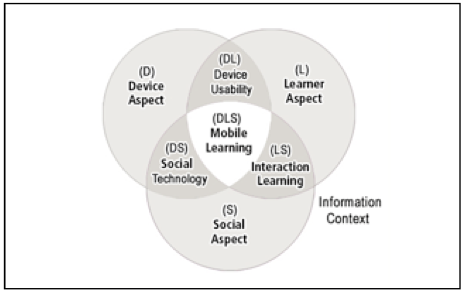
Figure 1. The FRAME Model
The device aspect (D) refers to the mobile devices and their physical and functional characteristics. The learner aspect (L) refers to the learner's cognitive abilities, prior knowledge, memory capacity, values, and motivations. The social aspect (S), describes social rules governing conversation and cooperation among people. When a learner interacts with a device, characteristics associated with device usability (DL) become significant. These characteristics include portability, information availability, psychological comfort, and satisfaction. Within this model, the interaction learning intersection (LS) is strongly social-constructivist in nature. As learners interact with others, they can become part of learning communities, giving and receiving feedback and building understanding. The cross-over between the device and social aspects results in social technology (DS) characterized by networking and collaborative tools. In balance, the three aspects (DLS) can function as a filter through which the learner can assimilate information environment and locate solutions to their unique problems.
Dragon search
Dictionary
Instagram ??
Angry Birds?
Veggie Samurai?
The 2010 Tech overview - CBC - Q - 2010-12-27 Stephen Dorff (but we’re actually listening to Clive Thompson 0 - 17:10)
- The iPad - mainly for consumption??
- GPS everywhere and augmented reality??
- Net neutrality?? everything travels at the same speed
School Issues - what are they?
Socialization:- digital divide,
- distractions,
- parent pressure,
- bullying
Take notes!
- Facebook and the teacher - Q - 2010-12-21 Andrea Martin (but we’re listening to the first few minutes about Facebook and teachers). Ian Grunwald in Wpg // Anthony Marko in Hamilton
What do you think?? - pair/share/report
Technical
- security,
- IT support
PD and access
- teacher PD - technical and pedagogical (teaching, learning and assessment and reporting)
- filtering or educating
Education - What are we heading for?
Our Digital Future: Jobs of Tomorrow (TVO - The Agenda)Research
How do we figure out what works and what doesn’t?BTR podcast - An Interview with Researcher and Teacher Victor Fitzgerald - Apr 08,2010 (12:00 - 16:00)
Marguerite Koole - ways to consider this “balance between the controls and constraints of social technologies and the needs of distance students.”
Figure 1. The FRAME Model
The device aspect (D) refers to the mobile devices and their physical and functional characteristics. The learner aspect (L) refers to the learner's cognitive abilities, prior knowledge, memory capacity, values, and motivations. The social aspect (S), describes social rules governing conversation and cooperation among people. When a learner interacts with a device, characteristics associated with device usability (DL) become significant. These characteristics include portability, information availability, psychological comfort, and satisfaction. Within this model, the interaction learning intersection (LS) is strongly social-constructivist in nature. As learners interact with others, they can become part of learning communities, giving and receiving feedback and building understanding. The cross-over between the device and social aspects results in social technology (DS) characterized by networking and collaborative tools. In balance, the three aspects (DLS) can function as a filter through which the learner can assimilate information environment and locate solutions to their unique problems.
These are a few of My Favourite Apps
Dragon dictateDragon search
Dictionary
Instagram ??
Angry Birds?
Veggie Samurai?
Saturday, January 15, 2011
ML Course Jan 15, 2011
Tom Peters on creative education
Scrolls to books , slates to paper and paper to digital - what really changes?
Finish overview presentation
Assignment questions? For an extensive bibliography see the Mobile Phone Syllabus from Columbia U. The link is on our Course page
Theory
What did you R/W/L? Poll to see what you R/W/L (This is from Polleverywhere.com)?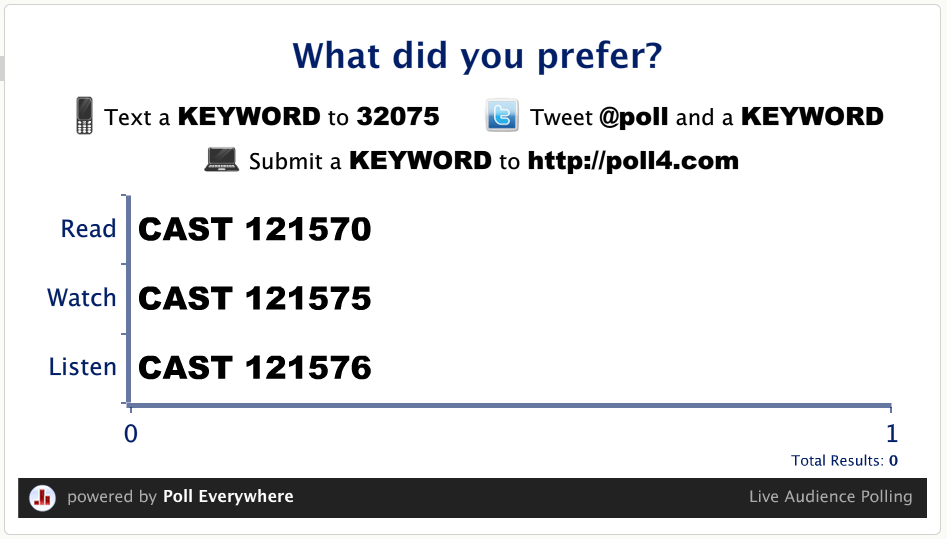
How might your students have answered this poll?
Share with your table group your thoughts about what you read. Summarize and share table highlights with all of us.
Thoughts to Consider
Anarchy - the internet as an ‘anarchist’ platform
Digital Habitats - digital stewardship
Digital bias - what do you do about this?
Social media - more or less connected? more or less safe? more or less aware (people, events, consequences)?
Digital Literacy - smarter of dumber?
Digital democracy - can we even discuss technology anymore? Anarchy?
Practical
Thoughts about device choicesYour favourite app
Demo of Ed Tool Apps:
- Dictionary
- Books - Kobo, Shakespeare
- iPadio
- Graphing calculator
- History Maps
- Biology - 3D brain
Podcasts from BTR on how schools are using cell phones and polleverywhere.
R/W/L for January 22
pockets_of_potential_ExecSum.pdf
pockets_of_potential_1_.pdf,Cellular Learning website

Mobile Learning
From this collection try: K12 Online Conference (a number of videos), Digital Bloom, The Coming Age, the Rennie Redekopp Daily, Technology for Communities, A computer per student
100 apps for tech savvy teachers
Friday, January 7, 2011
Teaching and Learning With Mobile Devices - Jan 8 2011
EDUB 5220 - G51
Connecting to the wireless network - MLCourse (mobilelearning)Introductions - R Redekopp (U of M and TCI)
Pictures with name tags
Least/worst option???
You - name, work - job and location, reason for taking course, your mobile device (if you have one), gut feelings about ML
Contact info - phone tree or whatever for snow days/cancellations
Class structure - times and breaks
R/W/L
Course Outline and assignments
Class wiki (click on request access) and blog and google docs/Windows Live and sharing
Class behaviour and etiqutte re: mobile devices
Break
Meta-Teach-Nition - what to do when you disagree with everyone else or are distracted.
What is education?
Overview (the overture!) of ML Course
Break
Library - Dafoe library from 12 - 1. Computer lab - turn right at the circ desk and go to the last lab.
Subscribe to:
Posts (Atom)